-
SMTP 이메일 인증 시스템프로젝트, 트러블슈팅 2025. 7. 11. 17:14

스터디 매칭 서비스 Stitch를 개발하면서 대학교 이메일 인증을 위해 univcert API를 사용하고 있었다. 하지만 프로젝트를 진행하던 중 univcert 서비스가 유지보수의 어려움으로 인해 종료된다는 소식을 접하게 됐다.
💡 해결책: 자체 SMTP 이메일 인증 시스템 구축
SMTP란 무엇인가?
SMTP(Simple Mail Transfer Protocol)는 이메일을 전송하기 위한 인터넷 표준 프로토콜이다. 하루 제한량(500개)이 있지만 무료이다. 아래의 설명에는 코드 중 일부를 넣어놨다. 전체 코드를 확인은 https://github.com/Sti-tch/backend 에서 확인 가능하다.
설계 목표
- 외부 의존성 최소화: 서드파티 API 대신 직접 구현
- 기존 API 호환성: 프론트엔드 수정 없이 사용 가능
- 안정성 확보: Gmail SMTP 활용으로 높은 가용성
- 확장성: 향후 기능 추가 용이
핵심 컴포넌트
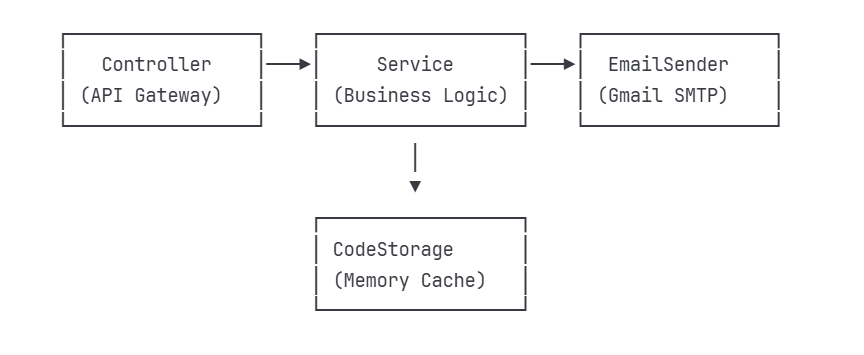
아키텍처 설명
- Controller: REST API 엔드포인트, 요청 검증
- Service: 비즈니스 로직, 코드 생성/검증
- EmailSender: JavaMailSender를 통한 Gmail SMTP 연동
- CodeStorage: 메모리 기반 인증코드 저장소 (Redis 없이 구현)
1. 인증코드 저장소 (VerificationCodeStorage)
@Component
public class VerificationCodeStorage {

    private final Map<String, VerificationCode> codeStorage = new ConcurrentHashMap<>();
    private final ScheduledExecutorService scheduler = Executors.newScheduledThreadPool(1);

    public void storeCode(String email, int code) {
        VerificationCode verificationCode = new VerificationCode(code, System.currentTimeMillis());
        codeStorage.put(email, verificationCode);

        // 5분 후 자동 삭제
        scheduler.schedule(() -> codeStorage.remove(email), 5, TimeUnit.MINUTES);
    }

    public boolean verifyCode(String email, int code) {
        VerificationCode stored = codeStorage.get(email);
        if (stored == null) return false;

        // 5분 만료 체크
        if (System.currentTimeMillis() - stored.getTimestamp() > 300000) {
            codeStorage.remove(email);
            return false;
        }

        return stored.getCode() == code;
    }
}
특징
Redis 없이도 동작하는 경량화 설계를 하였고, 5분 후 자동 삭제로 메모리 효율성을 확보하였다. 그리고 스레드 안전을 위해 ConcurrentHashMap으로 동시성 보장함.
2. 이메일 발송 서비스
@Service
@RequiredArgsConstructor
public class UnivCertService {

    private final JavaMailSender mailSender;
    private final VerificationCodeStorage codeStorage;

    public Map<String, Object> sendVerificationEmail(String email, String univName) {
        try {
            // 6자리 랜덤 코드 생성
            int verificationCode = 100000 + random.nextInt(900000);

            // 이메일 발송
            SimpleMailMessage message = new SimpleMailMessage();
            message.setTo(email);
            message.setSubject("[Stitch] 대학교 이메일 인증");
            message.setText(createEmailContent(univName, verificationCode));
            message.setFrom("qwer@gmail.com");

            mailSender.send(message);

            // 인증 코드 저장
            codeStorage.storeCode(email, verificationCode);

            return createSuccessResponse("인증 메일이 발송되었습니다.");

        } catch (Exception e) {
            return createErrorResponse(500, "메일 인증 발송에 실패했습니다.");
        }
    }
}
특징
6자리 숫자의 랜덤 코드를 생성, STMP 발송 실패시 안전한 예외처리, 인증 성공시 코드 즉시 삭제로 재사용 방지함.
3. Gmail SMTP 설정
@Configuration
public class MailConfig {

    @Value("${spring.mail.host}")
    private String host;

    @Value("${spring.mail.port}")
    private int port;

    @Value("${spring.mail.username}")
    private String username;

    @Value("${spring.mail.password}")
    private String password;

    @Bean
    public JavaMailSender javaMailSender() {
        JavaMailSenderImpl mailSender = new JavaMailSenderImpl();
        mailSender.setHost(host);
        mailSender.setPort(port);
        mailSender.setUsername(username);
        mailSender.setPassword(password);

        Properties props = mailSender.getJavaMailProperties();
        props.put("mail.transport.protocol", "smtp");
        props.put("mail.smtp.auth", "true");
        props.put("mail.smtp.starttls.enable", "true");

        return mailSender;
    }
}
# Gmail SMTP 설정 spring.mail.host=smtp.gmail.com spring.mail.port=587 spring.mail.username=your-email@gmail.com spring.mail.password=your-app-password spring.mail.properties.mail.smtp.auth=true spring.mail.properties.mail.smtp.starttls.enable=true특징
properties 파일로 환경별 설정 관리를 하고 앱 비밀번호를 통해 2단계 인증과 별개의 전용 비밀번호 사용함.
또한 JavaMailSender Bean으로 의존성 주입 간편화.
4. REST API 컨트롤러
@RestController
@RequestMapping("/api/auth")
@RequiredArgsConstructor
public class UnivCertController {

    private final UnivCertService univCertService;
    private final CampusRepository campusRepository;
    private final UserCamInfoService userCamInfoService;
    private final UserRepository userRepository;

    @PostMapping("/university/verify")
    public ResponseEntity<Map<String, Object>> sendVerificationEmail(
            @RequestBody EmailVerificationRequest request) {

        // 1. 현재 로그인한 사용자 확인 (OAuth2)
        Authentication auth = SecurityContextHolder.getContext().getAuthentication();
        CustomOAuth2User oAuth2User = (CustomOAuth2User) auth.getPrincipal();
        String userEmail = oAuth2User.getEmail();

        User user = userRepository.findByEmail(userEmail)
                .orElseThrow(() -> new UserException.UserNotFoundException());

        // 2. 이미 인증된 사용자인지 확인
        if (user.isCampusCertified()) {
            throw new UserException.UserAlreadyCertifiedException();
        }

        // 3. 이메일 도메인 검증
        String emailDomain = extractDomain(request.getEmail());
        Campus campus = campusRepository.findByName(request.getUnivName())
                .orElseThrow(() -> new UserException.CampusNotFoundException());

        if (!emailDomain.endsWith(campus.getDomain())) {
            throw new UserException.InvalidCampusEmailDomainException();
        }

        // 4. 기존 인증 상태 초기화 후 이메일 발송
        univCertService.clearVerificationStatus(request.getEmail());
        Map<String, Object> response = univCertService.sendVerificationEmail(
                request.getEmail(), request.getUnivName()
        );

        return ResponseEntity.ok(response);
    }

    @PostMapping("/university/verify-code")
    public ResponseEntity<Map<String, Object>> verifyCode(
            @RequestBody CodeVerificationRequest request) {

        // 코드 검증 후 UserCamInfo 생성
        Map<String, Object> response = univCertService.verifyCode(
                request.getEmail(), request.getUnivName(), request.getCode()
        );

        if ((int)response.get("code") == 200) {
            Authentication auth = SecurityContextHolder.getContext().getAuthentication();
            CustomOAuth2User oAuth2User = (CustomOAuth2User) auth.getPrincipal();
            String userEmail = oAuth2User.getEmail();

            User user = userRepository.findByEmail(userEmail)
                    .orElseThrow(() -> new UserException.UserNotFoundException());

            userCamInfoService.createUserCamInfo(
                    user.getId(), request.getEmail(), request.getUnivName()
            );
        }

        return ResponseEntity.ok(response);
    }
}
특징
- OAuth2 통합: 소셜 로그인 정보 활용한 사용자 식별
- 다층 검증: 사용자 → 도메인 → 대학교 순차적 확인
- 트랜잭션 처리: 인증 성공시에만 UserCamInfo 생성
- API 호환성: 기존 univcert와 동일한 엔드포인트 유지
결론
첫 프로젝트 다 보니 외부 api를 가져와 사용해보고 싶었는데 갑작스러운 서비스 종료로 당황하게 됐다. 하지만 이를 통해 SMTP를 직접 구현하며 다양한 경험을 쌓을 수 있는 좋은 기회가 되었다. 이번 경험은 외부 api는 언제든지 서비스가 종료 될 수 있다라는 점을 생각하고 사용해야한다는 점을 알게 됐다.
'프로젝트, 트러블슈팅' 카테고리의 다른 글
복합 유니크 제약조건으로 중복 데이터 막기 (0) 2026.03.01 JPA N+1 문제와 @EntityGraph로 해결하기 (0) 2026.03.01 JWT 인증에서 Access Token, Refresh Token, Redis가 필요한 이유 (0) 2026.03.01 해커톤에서 OAuth2 로그인이 안 됐던 이유 (0) 2026.03.01 JPA 일대일 양방향 매핑에서 발생한 무한 순환 참조 문제와 해결 (0) 2024.12.23